Follow the steps below to transfer money to/from Bill Pay funds.
- Important: You must have the appropriate permissions to transfer money in Bill Pay. See: How do I review and update Bill Pay access?
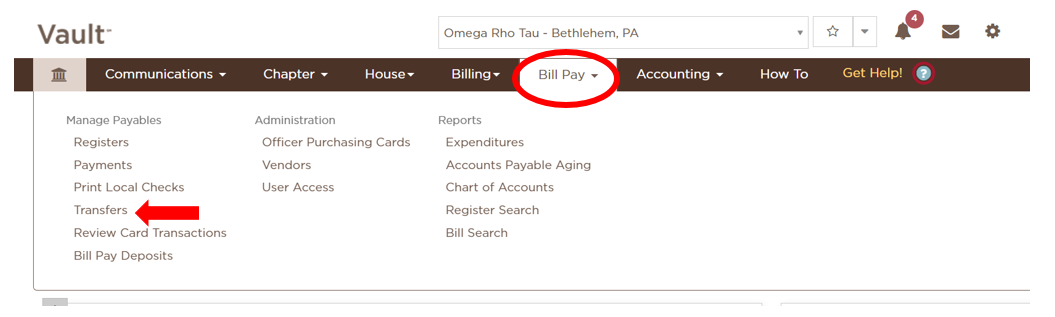
Go to the Bill Pay tab and select the Transfers link.
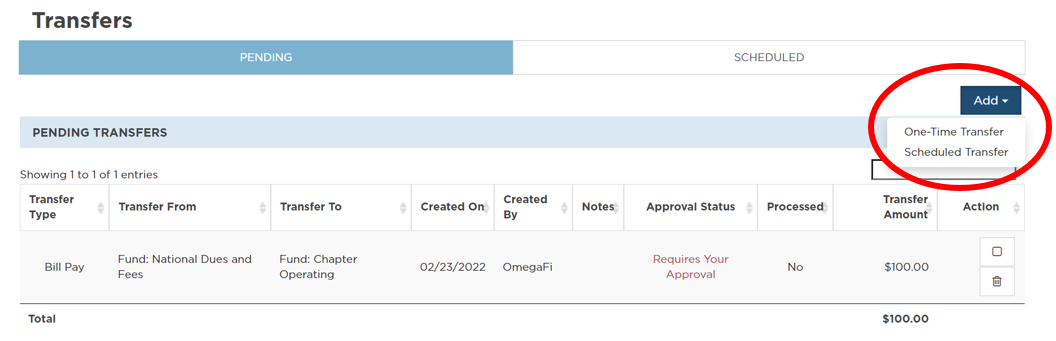
Select Add to set up a one-time transfer or establish recurrent scheduled transfers.
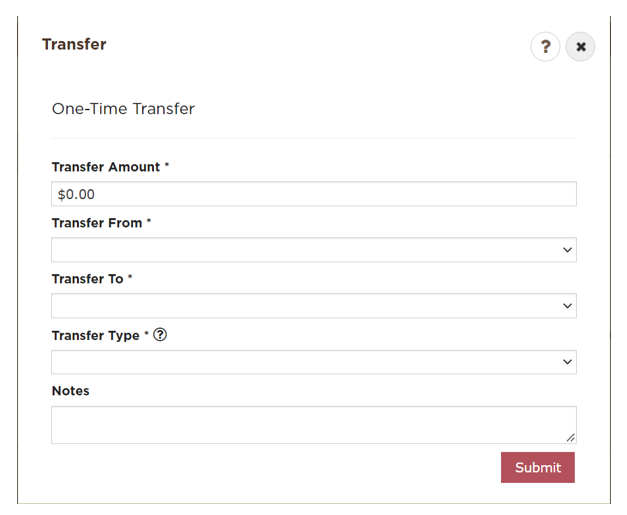
You may transfer between Bill Pay accounts, Officer Purchasing Cards, and any external bank accounts.*
*If your organization has a Bill Pay fund mandated by your national headquarters, some fields in the Add Fund User Rights window may be grayed out because you do not have permission to transfer money out of the fund or authorize payments.
Note: Officer Purchasing Cards must be funded from the primary Bill Pay Fund.
If you are transferring to or from an external bank account, you will choose between two transfer types – ACH and Wire.
- ACH is a standard bank transfer and takes 2-3 business days to process.
- There is no additional cost associated with ACH transfers.
- A wire transfer, if initiated before 4 EST results in same-day funds.
- There is a $75 fee for wire transfers.